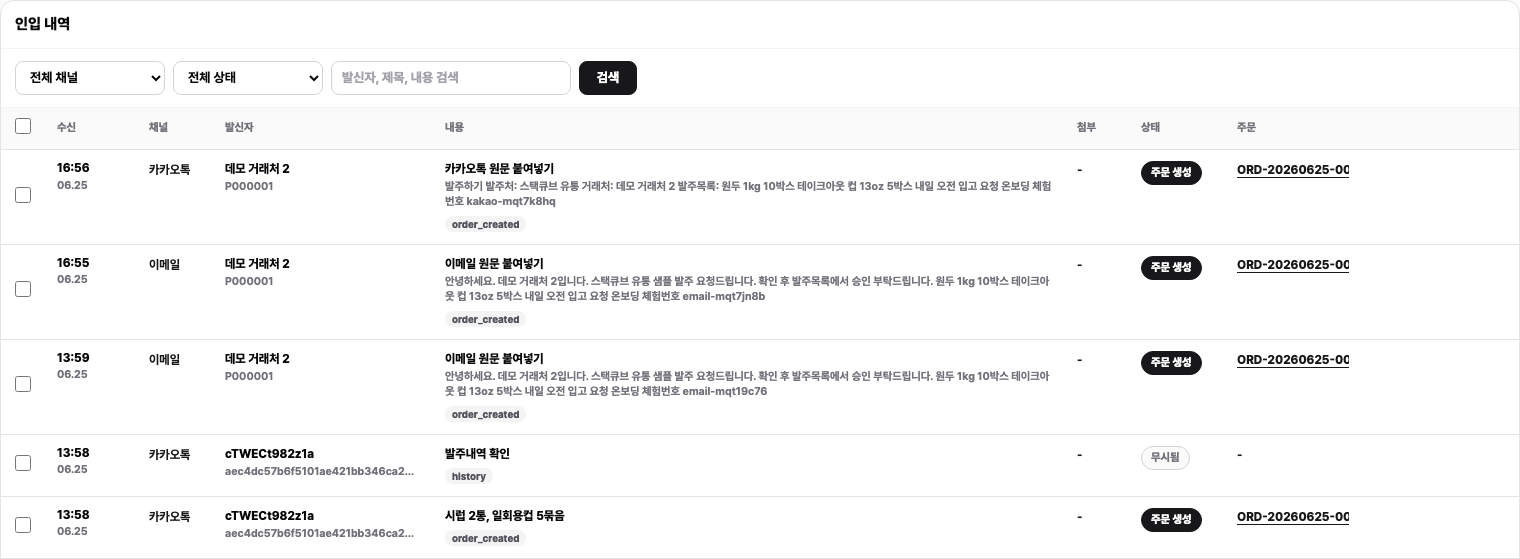
StackCube’s AI intake layer sits at the front of every order workflow. Instead of manually parsing emails, copying values out of chat threads, or reformatting spreadsheet attachments, you point your channels at StackCube and let the AI engine do the extraction work. Every incoming message, file, or email is read, structured, and turned into a reviewable order candidate — complete with matched SKUs and verified pricing — before a human ever touches it. The result is a consistent, auditable starting point for every order, regardless of how it arrived.

How AI intake works

1

Receive unstructured input

StackCube accepts orders from multiple sources: email threads, live chat messages, PDF attachments, and uploaded spreadsheets. No formatting requirements are imposed on your customers — they send orders the way they already do.
2

Extract order data with AI

The AI engine reads each message or file and pulls out the structured fields that matter: customer identity, line items, quantities, unit prices, and any delivery or reference details included in the source. Fields that are ambiguous or missing are flagged rather than silently guessed.
3

Match items against your SKU catalog

Each extracted line item is matched against your registered SKU catalog. When a customer writes a product name, abbreviation, or internal shorthand, the AI resolves it to the correct SKU where possible. Lines that cannot be confidently matched are surfaced in the review queue with a SKU match status so your team can resolve them manually.
4

Apply per-customer pricing rules

After SKU matching, StackCube checks each line against the pricing rules you have configured for that customer. If the submitted price matches the rule, the line is marked clean. If there is a discrepancy, the candidate is flagged for price review before approval.
5

Create an order candidate for review

The completed extraction — structured data, SKU matches, and pricing verdicts — is assembled into an order candidate and placed in your review queue. Your team reviews, corrects if needed, and approves. The original source (email, chat message, or file) is preserved as evidence alongside the candidate.

What the AI extracts

Customer identity

Company name, contact details, and account reference, matched against your customer records.

Line items

Product names, descriptions, and catalog references as written by the customer, before SKU resolution.

Quantities

Unit counts, case quantities, and any unit-of-measure details included in the source message.

Pricing

Submitted unit prices and totals, checked against your per-customer pricing rules during candidate creation.

Supported input formats

Email

Full email threads, including forwarded chains and inline order text.

Chat messages

Direct messages and chat-based orders from connected messaging channels.

PDF attachments

Purchase orders, order forms, and other documents sent as PDF files.

Spreadsheets

Excel and CSV uploads with order line data in any column layout.

Order portal

Customers submit orders directly through their dedicated StackCube order portal, with items and quantities entered against your catalog.

AI candidate statuses

After extraction, each candidate or line carries a status that tells your team exactly what needs attention before approval.
StatusMeaning
OrganizedExtraction complete, SKU matched, pricing verified. Ready to approve.
ReviewOne or more fields require manual inspection before the line can be approved.
SKU matchThe extracted item could not be confidently resolved to a catalog SKU.
PendingCandidate is awaiting further processing or additional input.

Data privacy and AI usage

StackCube’s AI extraction is powered by the OpenAI API. Your order data is never used to train AI models. All processing is performed on a per-request basis, and no customer or order information is retained by the AI provider for training purposes. If you prefer to operate without AI-assisted extraction, deactivation is available on request — contact your account team to arrange it.

Tips for best results

The more complete your SKU catalog and per-customer pricing rules, the higher the proportion of candidates that arrive in the review queue fully resolved and ready to approve. Take time to register all active SKUs and configure pricing before connecting your first channel.
If the AI cannot extract a minimum viable order — for example, a message with no identifiable items or quantities — the source is held in an unprocessed state and surfaced to your team for manual handling. Nothing is silently discarded. You retain access to the original source at all times.
Yes. Every field in an order candidate is editable in the review queue. Corrections you make are saved against the candidate and reflected in the final approved order. The original source remains attached as evidence, so you always have a record of what was submitted versus what was approved.